TL;DR
A car diagnostic scan tool reads trouble codes and, depending on its compatibility and features, may show live data or access systems such as ABS and transmission controls. A code points to a detected condition; it does not automatically identify a failed part. Check your vehicle’s supported systems, keep useful code information before clearing anything, and seek a qualified mechanic for safety-critical faults or high-voltage hybrid and EV work.
A check-engine light flickers on during your commute, and your car still sounds normal. A car diagnostic scan tool can tell you what fault the vehicle recorded, but that three- or four-digit code is more like a trail marker than a verdict: it points toward a problem without naming the part you need to replace.

Get business pricing on garage and car supplies
- Business-only prices and quantity discounts
- Tax-exempt purchasing
- Multiple users, one account, clear invoices
This guide explains what scan tools do, how the main types differ, and what to check before buying one. You’ll also learn how to save useful information before clearing a code, why the same scanner may work differently across vehicles, and when the safest next step is a professional diagnosis.
A DTC identifies a detected condition; it does not prove that the named sensor or part has failed.
Check compatibility by make, model, year, and module before buying, especially for ABS, airbags, transmission, and service functions.
Save codes and freeze-frame details before clearing anything; clearing can erase evidence and reset emissions readiness monitors.
A basic reader may be enough for common engine codes, while live data or broader system access calls for a more capable, vehicle-compatible tool.
Have certified mechanics handle safety-critical repairs, and leave high-voltage hybrid or EV diagnosis to trained professionals.
What a scan tool can tell you before you call a mechanic
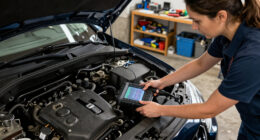
A car diagnostic scan tool reads information from a vehicle’s onboard computers, including diagnostic trouble codes (DTCs) and, on many tools, live sensor data. Most US-market cars from model year 1996 onward have an OBD-II port, generally under the dashboard, though other regions adopted related standards on different schedules. A tool connects there and asks the car’s computers what they have recorded.
That exchange can give you a better starting point. For example, if your check-engine light comes on after a cold morning and the reader reports a fault related to an oxygen-sensor circuit, you know which system to investigate. The code does not prove the sensor itself has failed: damaged wiring, a connector problem, or another fault could produce similar evidence. The computer marks the trail; diagnosis follows it.
Depending on its features and your car, a scan tool may show live data, such as engine temperature or sensor readings, and may check emissions readiness. A basic reader may only access common engine-related codes. A more capable model may reach other vehicle modules, such as ABS or transmission controls, when it supports your exact car.
Think of a car diagnostic scan as the first conversation in a repair visit. If your reader finds a code and your car has a rough idle, tell the mechanic both facts. That small detail helps them interpret the code alongside what the car actually does.
Products Worth Considering

VIOFO A229 Plus Front and Rear Dash Cam with Dual 2K Recording

DEWALT 20V MAX Brushless 3-Tool Power Tool Set with Drill, Impact Driver, Oscillating Multi-Tool, 3 Batteries, and Charger

DEWALT 20V MAX XR Hammer Drill and Impact Driver Combo Kit with Two 4Ah Batteries and Charger
As an affiliate, we earn on qualifying purchases.
Why a trouble code points to a problem but rarely names the part
A trouble code describes a detected fault or condition; it usually does not establish exactly which component failed. Scan results narrow the search, while symptoms, measurements, wiring checks, and vehicle-specific service information help identify the cause. That distinction can save you from buying a new part just because its name appears in an app’s code description.
Say your car records a code for a temperature reading that looks too low. A damaged sensor is one possibility, but a loose connector or a wiring fault could also affect the signal. On a freezing morning, the timing and engine temperature matter too. A scan tool may display the number, but you need context to decide whether it makes sense.
A scan tool reads information from a. . vehicle system, but the display does not always explain how several readings fit together. Watch how data changes as the engine warms up; compare readings with reliable guidance for your vehicle. A mechanic may use a meter or other equipment to test the circuit before recommending a repair. The code is a clue, not a parts order.
Keep a quick note of the code, symptoms, and driving conditions. For instance: “Light came on after a ten-minute drive; engine shook at a stop.” That short record gives a shop more to work with than “the scanner said sensor,” especially if the problem appears and disappears.
Pick a scanner that matches your car and the jobs you’ll do
The right scanner is the one that supports the make, model, year, and vehicle systems you need. A cheap reader can be a perfectly practical choice for checking common engine codes, while an enthusiast tracking live sensor data may need more features. Brand names and feature counts cannot replace a compatibility check for your specific vehicle.
Basic code readers usually retrieve common powertrain codes and may clear them. Phone-connected Bluetooth or Wi-Fi adapters add an app, but results depend on the adapter, software, subscriptions, and vehicle support. Midrange scanners often add live data, code explanations, readiness checks, or some manufacturer-specific coverage. Professional or manufacturer-level tools may offer broader module access and commands, sometimes with paid software, an account, or secure-gateway authorization.
Imagine you own an older sedan and mainly want to read a check-engine light before calling a repair shop. A simple reader may cover that need. If your newer car has an ABS warning, you’ll need to confirm that a prospective tool reads ABS codes for your exact model; many basic readers only see engine-related systems. “All systems” on a product page does not guarantee every function works on every car.
Compare the features that change how you’ll use the tool: live-data graphs, system coverage, app quality, updates, and ongoing fees. A clear screen or useful export can make a scan easier to share. Before buying, check the manufacturer’s compatibility information and whether key features require a subscription.
| Tool type | Often useful for | Check before buying |
|---|---|---|
| Basic reader | Common engine codes | Code coverage and data limits |
| Phone adapter | App-based scans and graphs | Adapter, app, and subscription support |
| Midrange scanner | Live data and some expanded diagnostics | Exact vehicle and module compatibility |
| Professional-level tool | Broad diagnostics and service functions | Accounts, paid software, and gateway access |
Save useful evidence before you clear a warning light
Before clearing a code, write down the code, description, symptoms, and any freeze-frame information the tool displays. Freeze-frame data can record conditions around the moment a fault appeared, such as engine speed or temperature. Clearing a code may erase that useful snapshot and reset emissions readiness monitors, so you could lose context before a mechanic sees it.
Try this simple sequence when you connect a reader. Park safely, follow the tool’s instructions, and record what appears before changing anything. If you are unsure what a command will do, stop at reading the data; scan tools can have options that go beyond showing codes.
- Check your vehicle’s manual for scan or warning-light guidance.
- Read and save all available codes, descriptions, and freeze-frame details.
- Write down when the light appeared and how the car behaved.
- Use a trusted repair source or mechanic to decide what to test next.
- Clear the code only when you understand the tradeoff and have a reason to do so.
This matters if you’re preparing for an emissions inspection. After a code clear or battery disconnection, monitors may need normal driving conditions to run their self-tests. A car can have no warning light and still show monitors as “not ready.” If you clear the light the night before an inspection, you may create a new delay instead of fixing the original issue.
Clearing a code does not repair its cause. If the fault remains, the light can return. Treat the clear button like erasing a note from a dashboard: it can make the screen look tidier, but it does not change what the car needs.
Know when a scan belongs in a mechanic’s hands
A scan tool can help you understand a warning, but some situations call for prompt professional diagnosis. A flashing check-engine light often signals a severe misfire risk; reduce driving and arrange help promptly. Warning lights for brakes or airbags involve safety systems, so have a qualified mechanic inspect them rather than relying on a basic code description.
For example, if your brake warning appears alongside a soft pedal, don’t treat a scanner as a substitute for an inspection. A tool may provide a code from the ABS system if it supports that vehicle, but it cannot judge every mechanical issue from the code alone. For brake repairs, airbag work, and other safety-critical repairs, choose a certified mechanic.
Hybrid and electric vehicles add another boundary. Some consumer tools can read general diagnostic information, but access to battery, charging, and high-voltage systems varies by vehicle and device. High-voltage diagnosis or repair should go to a technician trained for that work; those systems can expose you to dangerous voltage even when the car seems switched off.
Also avoid unfamiliar bidirectional commands or coding procedures. These functions can command parts to operate or alter settings, and support differs across cars. Before buying, verify the tool maker’s current coverage for your exact model year and region. If a repair may involve a safety recall, check your vehicle identification number through the official NHTSA recall lookup in the United States, or the relevant national vehicle-safety authority where you live.
Turn scan results into a useful plan for your next repair
A scan becomes useful when you connect its results to the car’s behavior and choose a sensible next step. Record the code, symptoms, and timing, then check whether the tool’s definition applies to your vehicle. If the car starts normally and the light stays steady, you may have time to arrange a diagnosis; if it runs roughly or the light flashes, get help promptly.
Consider a driver whose car occasionally hesitates while merging. Their app shows a code, but the car drives normally on the shop’s short test drive. A saved code history and note that the hesitation happens after the engine warms up give the technician a more useful lead than an erased warning. Intermittent faults can be shy; they may disappear when the car is parked.
Live data can help you observe patterns, but a number only matters when you know the conditions around it. Engine temperature, speed, and vehicle specifications can change what counts as a reasonable reading. If you share a screenshot, include when and how you captured it; otherwise, a mechanic may see a number with no road map.
Use the scan to ask better questions: “Can you test the circuit before replacing the sensor?” or “Does this tool support the ABS module on my year and trim?” That approach makes your car diagnostic scan a practical bridge between a dashboard warning and a sound repair decision, not a guess dressed up as certainty.
Frequently Asked Questions
What does a car diagnostic scan tool do?
It connects to a vehicle’s diagnostic system and reads trouble codes. Depending on the tool and car, it may also show live sensor data, emissions readiness, or information from other modules.
Will a scan tool tell me exactly what is wrong?
Usually, it identifies a fault or condition, not the confirmed failed part. A mechanic may need to inspect wiring, take measurements, and compare the result with your car’s symptoms.
Can a basic reader check ABS or airbag codes?
Only if the reader supports those systems on your specific vehicle. Many basic tools cover common engine codes but do not access ABS, airbag, transmission, or body modules.
Will clearing a check-engine code fix the problem?
No. If the cause remains, the light may return. Clearing a code can also remove useful information and reset emissions readiness monitors, so save the results first.
Is a phone adapter as good as a handheld scanner?
It can handle basic checks, and some apps make live data easy to graph. Its usefulness depends on adapter quality, app features, vehicle support, and subscription costs.
Can I use a scan tool on a hybrid or electric car?
Some tools can read general vehicle information, but battery and high-voltage system coverage varies. Leave high-voltage diagnosis and repairs to a technician trained for that work.
Conclusion
Use a scan tool to gather clues, not to order parts by code name. Save the readings, match them to what your car is doing, and check that your tool supports the system you’re trying to understand.
When a warning touches brakes, airbags, or high-voltage systems, put the reader down and call a qualified professional. A code can point to the road ahead; careful diagnosis gets you safely around the bend.