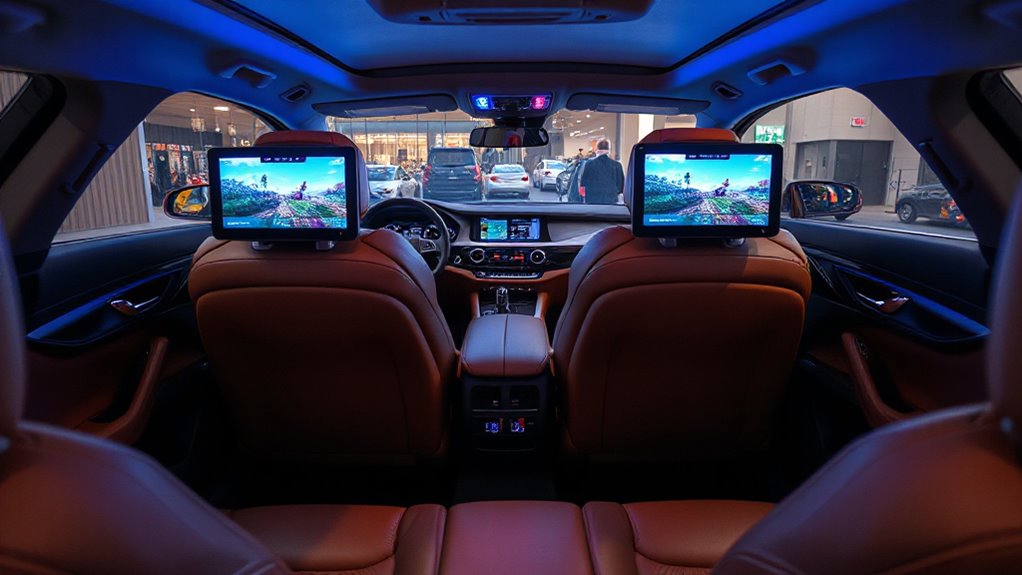
A rear seat entertainment system can give passengers their own screen for streaming, games, and downloaded video, but the right choice depends on screen size, quantity, and how you plan to connect. My best overall pick is the Seventour 15.6-Inch Android Car Headrest Monitors, Pair, for families who want large screens at both seats. The Seventour 12.4-inch 4K pair stands out for buyers who want two touchscreens and a more compact fit, while the 10.8-inch Android 13 two-pack is a sensible direction for families prioritizing smaller displays. The main tradeoff is between immersive screen area and cabin fit, with single monitors usually suiting one passenger better than a pair. Read on for the full breakdown and a guide to matching the system to your car and passengers.

Get business pricing on garage and car supplies
- Business-only prices and quantity discounts
- Tax-exempt purchasing
- Multiple users, one account, clear invoices
Complete the kit


Key Takeaways
- Paired screens suit shared family use: Several options come as two monitors, but their larger size may be a tight fit behind some front seats.
- Screen size changes the cabin experience: The 15.6-inch models favor expansive viewing, while the 10.8-inch two-pack is a smaller-screen alternative.
- Single-monitor models serve a different need: They can make sense when only one passenger needs a display, rather than outfitting both rear seats.
- 4K and Android 13 appear across multiple sizes: These labels do not settle fit, setup, or connectivity questions; check the specific model’s inputs and vehicle compatibility.
- Pair versus single is a bigger decision than the name suggests: Compare what comes in the box and how passengers will use the displays before choosing among similarly sized models.
| Seventour 15.6-Inch Android Car Headrest Monitors, Pair |  | Best for Large Shared Screens | Quantity: Pair | Screen size: 15.6 inches each | Display and resolution: IPS LCD touchscreen, 1920 × 1080 | VIEW ON AMAZON | See Our Full Breakdown |
| 12.4-Inch Android Headrest Monitors, Pair |  | Best for Balanced Pair Setup | Quantity: Pair | Screen size: 12.4 inches each | Display and resolution: IPS touchscreen, 1920 × 1080 | VIEW ON AMAZON | See Our Full Breakdown |
| Seventour 15.6-Inch Android Car Headrest Monitor |  | Best Single-Screen Upgrade | Quantity: Single monitor | Screen size: 15.6 inches | Display and resolution: IPS touchscreen, 1920 × 1080 | VIEW ON AMAZON | See Our Full Breakdown |
| Seventour 12.4″ 4K Android 13 Car Headrest Monitor (Pair), Dual Touch Screens, Wireless Mirroring, WiFi/HDMI/BT/Video Player |  | Best for Separate Viewing | Quantity: Pair | Screen size: 12.4 inches each | Listed resolution: 1920 × 1080 | VIEW ON AMAZON | See Our Full Breakdown |
| 13.5-inch Android Car Headrest Monitor with Touchscreen and Wireless Mirroring |  | Best Mid-Size Single Monitor | Quantity: Single monitor | Screen size: 13.5 inches | Resolution: 1920 × 1280 | VIEW ON AMAZON | See Our Full Breakdown |
| 11.5-inch Android 13 Car Rear Seat Touchscreen Monitor with 4K Video Playback and Screen Mirroring |  | Best Compact Single Monitor | Screen: 11.5-inch 2K in-cell touchscreen | Operating system: Android 13 | Video playback: 4K Ultra HD, up to 3840 × 2160 at 60 fps | VIEW ON AMAZON | See Our Full Breakdown |
| 14-Inch Android Car Headrest Monitors, Pair |  | Best for Two-Passenger Coverage | Package: Pair of monitors | Screen: 14-inch IPS touchscreen, 2240 × 1400 | Operating system: Android 13 | VIEW ON AMAZON | See Our Full Breakdown |
| 14-Inch Android Car Headrest Monitor |  | Best Large-Screen Single Monitor | Screen: 14-inch IPS touchscreen | Resolution: 2240 × 1400 | Operating system: Android 13 | VIEW ON AMAZON | See Our Full Breakdown |
| 14 Inch 4K Android 13 Car Headrest Monitor with Touch Screen and Wireless Mirroring |  | Best for Broad Device Connectivity | Screen: 14-inch IPS touchscreen | Listed resolution: 2240 × 1400 | Operating system: Android 13.0 | VIEW ON AMAZON | See Our Full Breakdown |
| 10.8-Inch Android 13 Headrest Monitor with 2 GB RAM and 32 GB Storage, 2-Pack |  | Best Value Pair for Synchronized Playback | Package: 2 monitors | Screen: 10.8 inches | Display resolution: 1920 × 1080 | VIEW ON AMAZON | See Our Full Breakdown |
| 15.6 inch 4K Android Car Headrest Monitor with Touch Screen and Wireless Mirroring |  | Best for a Large Single-Screen Setup | Screen size: 15.6 inches | Resolution: 1920 x 1080 | Operating system: Android 13.0 | VIEW ON AMAZON | See Our Full Breakdown |
| rear seat entertainment system | Operating system | Audio | Screen size | Connectivity |
|---|---|---|---|---|
| Seventour 15.6-Inch Android Ca | Android 13 | Built-in speakers, wired or Bluetooth headphones, FM transmission | 15.6 inches each | Dual-band Wi-Fi, Bluetooth, HDMI |
| 12.4-Inch Android Headrest Mon | Android 10.0 | Built-in speakers, wired or Bluetooth headphones, FM transmission | 12.4 inches each | 2.4 GHz and 5 GHz Wi-Fi, Bluetooth, HDMI, USB, microSD |
| Seventour 15.6-Inch Android Ca | Android 13 | Stereo speakers, wired or Bluetooth headphones, FM transmission | 15.6 inches | Bluetooth, HDMI, USB, microSD |
| Seventour 12.4" 4K Android 13 | Android 13 | — | 12.4 inches each | 2.4 GHz and 5 GHz Wi-Fi, HDMI, Bluetooth |
| 13.5-inch Android Car Headrest | Android 13 | — | 13.5 inches | — |
| 11.5-inch Android 13 Car Rear | Android 13 | Dual stereo speakers | — | Wi-Fi, Bluetooth, HDMI, USB, TF card |
| 14-Inch Android Car Headrest M | Android 13 | Built-in speakers, Bluetooth or wired headphones, and FM transmission | — | — |
| 14-Inch Android Car Headrest M | Android 13 | Speakers, Bluetooth or wired headphones, and FM radio | — | — |
| 14 Inch 4K Android 13 Car Head | Android 13.0 | — | — | — |
| 10.8-Inch Android 13 Headrest | — | Built-in speakers, FM transmitter, wired headphones, and Bluetooth headphones | — | 5 GHz/2.4 GHz Wi-Fi, Bluetooth, HDMI input/output, USB, and SD card |
| 15.6 inch 4K Android Car Headr | Android 13.0 | — | 15.6 inches | — |
More Details on Our Top Picks
Seventour 15.6-Inch Android Car Headrest Monitors, Pair
For families who want two large screens rather than a compact setup, this Seventour pair offers 15.6-inch Full HD touch displays with Android 13. Each monitor can run apps or mirror a phone, while HDMI, USB, and microSD give you ways to play content without relying entirely on streaming. Compared with the 12.4-Inch Android Headrest Monitors, the larger panels are easier to watch from the back seat, but they take up more visual space and may be less suited to smaller cabins. Audio can go through speakers, headphones, or FM to the car stereo, though FM quality can vary. For shared playback between screens, plan on an HDMI cable; wireless mirroring is not the same as a built-in synchronized link. Online apps also need Wi-Fi or a phone hotspot.
Pros:- Pair of 15.6-inch Full HD IPS touchscreens
- Android 13 supports app downloads and phone mirroring
- HDMI, USB, and microSD provide several playback routes
- Audio options include headphones, built-in speakers, and FM transmission
Cons:- Large screens may crowd smaller vehicle interiors
- Shared playback across the pair requires an HDMI cable
- Streaming apps need a Wi-Fi network or phone hotspot
Best for: Families with a roomy back seat who want two large touchscreens for apps, mirrored phones, and offline media.
Not ideal for: Drivers with compact vehicles or buyers who want synchronized playback between both screens without connecting an HDMI cable.
- Quantity:Pair
- Screen size:15.6 inches each
- Display and resolution:IPS LCD touchscreen, 1920 × 1080
- Operating system:Android 13
- Connectivity:Dual-band Wi-Fi, Bluetooth, HDMI
- Mirroring:AirPlay and Miracast
- Ports:HDMI input and output, USB, microSD
- Audio:Built-in speakers, wired or Bluetooth headphones, FM transmission
Our verdict“Choose this pair if screen size is your priority and you can accommodate its larger displays and wired shared-playback setup.”
12.4-Inch Android Headrest Monitors, Pair
This pair suits buyers who want two Full HD touchscreens without stepping up to the 15.6-inch footprint of the Seventour pair. At 12.4 inches, the screens offer a more restrained fit for many cabins while retaining Android apps, phone mirroring, and HDMI, USB, and microSD playback. The tradeoff is the Android 10.0 system, which is older than Android 13 on the Seventour 15.6-Inch pair and single-screen model; buyers focused on a newer listed OS may prefer those alternatives. Audio choices are flexible, including headphones and FM transmission, and the included adapters support car or home use. The product description also notes broad vehicle compatibility, but a universal bracket is not a guarantee of fit for every headrest, so check your seat layout before choosing.
Pros:- Two 12.4-inch Full HD IPS touchscreens
- Supports AirPlay and Miracast phone mirroring
- HDMI, USB, microSD, and Bluetooth support varied sources
- Includes dual power adapters and a metal mounting bracket
Cons:- Runs Android 10.0 rather than the Android 13 found on several alternatives
- Universal bracket may not fit every vehicle or headrest
- Online streaming requires Wi-Fi access
Best for: Families wanting two mid-sized Full HD monitors with app access, multiple audio choices, and car-or-home power adapters.
Not ideal for: Buyers who specifically want Android 13 or the largest available screens in this group.
- Quantity:Pair
- Screen size:12.4 inches each
- Display and resolution:IPS touchscreen, 1920 × 1080
- Operating system:Android 10.0
- Connectivity:2.4 GHz and 5 GHz Wi-Fi, Bluetooth, HDMI, USB, microSD
- Audio:Built-in speakers, wired or Bluetooth headphones, FM transmission
- USB storage support:Up to 1 TB
- Mounting and power:Metal universal bracket; dual power adapters
Our verdict“Pick this pair for a less imposing two-screen setup, provided Android 10.0 meets your needs and the bracket suits your vehicle.”
Seventour 15.6-Inch Android Car Headrest Monitor
Unlike the Seventour 15.6-Inch pair, this model is a single 15.6-inch monitor, making it a better match when one rear passenger needs a large display or when you prefer not to outfit both seats. It keeps the pair’s headline strengths: a Full HD IPS touchscreen, Android 13, dual-band Wi-Fi, phone mirroring, and HDMI, USB, and microSD inputs. That broad source selection helps when a trip calls for downloaded files or an external device rather than streaming. Its larger screen can be easier to share across a bench seat than the 12.4-Inch Android Headrest Monitors, but a single display gives passengers less individual control over what they watch. Online content still depends on Wi-Fi or a hotspot, and some playback claims rely on compatible external equipment.
Pros:- Large 15.6-inch Full HD IPS touchscreen
- Android 13 with dual-band Wi-Fi and app support
- AirPlay and Miracast phone mirroring
- HDMI, USB, microSD, and several audio output options
Cons:- One screen cannot serve passengers as independently as a pair
- Streaming needs Wi-Fi or a personal hotspot
- Some media and device compatibility depends on external equipment
Best for: Households that want one large, app-capable rear display for a primary passenger rather than a monitor at each seat.
Not ideal for: Families whose passengers want separate screens or independent viewing choices.
- Quantity:Single monitor
- Screen size:15.6 inches
- Display and resolution:IPS touchscreen, 1920 × 1080
- Operating system:Android 13
- Wi-Fi:2.4 GHz and 5 GHz
- Connectivity:Bluetooth, HDMI, USB, microSD
- Phone mirroring:AirPlay and Miracast
- Audio:Stereo speakers, wired or Bluetooth headphones, FM transmission
Our verdict“Choose this single monitor if one passenger needs a large Android screen and a second display would go unused.”
Seventour 12.4″ 4K Android 13 Car Headrest Monitor (Pair), Dual Touch Screens, Wireless Mirroring, WiFi/HDMI/BT/Video Player
This pair’s standout is not its screen size but its dual-screen flexibility: passengers can watch the same content or choose different content on separate displays. That makes it more adaptable than the single Seventour 15.6-Inch monitor when siblings have different preferences, while its 12.4-inch panels are less imposing than the larger pair. The listing calls the screens 4K, but the stated resolution is 1920 × 1080, so I would treat that as Full HD rather than native 4K. Android 13, 4 GB RAM, and 64 GB storage are specified, alongside wireless mirroring and OTA updates. The main catch is that synchronized playback requires a wired connection between the screens; buyers wanting an uncomplicated all-wireless shared setup may prefer a different arrangement.
Pros:- Two 12.4-inch touchscreens can show the same or different content
- Android 13 with 4 GB RAM and 64 GB storage
- Wireless phone mirroring and app downloads
- OTA updates and included dual power adapters
Cons:- Listed native resolution is Full HD, despite the 4K description
- Synchronized playback requires a wired screen-to-screen connection
- Android setup and updates may take extra effort
Best for: Families with two rear passengers who want the option of separate content on each screen, plus a wired route to synchronized viewing.
Not ideal for: Buyers seeking native 4K resolution or a pair that synchronizes playback without a cable between monitors.
- Quantity:Pair
- Screen size:12.4 inches each
- Listed resolution:1920 × 1080
- Operating system:Android 13
- Memory and storage:4 GB RAM, 64 GB storage
- Connectivity:2.4 GHz and 5 GHz Wi-Fi, HDMI, Bluetooth
- Playback:Dual screens support same or separate content
- Mounting and power:Universal metal brackets; dual power adapters
Our verdict“Choose this pair for flexible independent viewing, not for native 4K or cable-free synchronization.”
13.5-inch Android Car Headrest Monitor with Touchscreen and Wireless Mirroring
With a 13.5-inch screen, this single monitor lands between the 12.4-inch pair and Seventour’s 15.6-inch single display. That middle ground can suit a passenger who wants more viewing area than a compact monitor without giving up as much cabin space as the largest option. Android 13, AirPlay and Miracast, plus HDMI, USB, and Bluetooth cover common app and device needs. The stated 1920 × 1280 resolution is distinct from the Full HD panels on the Seventour models, while 4K playback describes supported video rather than the panel’s native resolution. Its 2 GB RAM and 32 GB storage are more modest than the 4 GB/64 GB listed on the Seventour 12.4-inch pair, and this is only one screen, so it is a weaker fit for passengers who need separate displays.
Pros:- 13.5-inch touchscreen offers a middle size between compact and extra-large options
- Android 13 with AirPlay and Miracast
- HDMI, USB, Bluetooth, and Wi-Fi support multiple sources
- 1920 × 1280 stated screen resolution
Cons:- Single monitor does not provide separate displays for two passengers
- 2 GB RAM and 32 GB storage are modest beside the Seventour 12.4-inch pair
- Requires vehicle power through a 12V cigarette-lighter or DC adapter
Best for: Drivers who want one mid-sized Android monitor with phone mirroring and HDMI or USB playback for a rear passenger.
Not ideal for: Families needing two independent screens or buyers who expect generous memory for heavier app use.
- Quantity:Single monitor
- Screen size:13.5 inches
- Resolution:1920 × 1280
- Operating system:Android 13
- Memory and storage:2 GB RAM, 32 GB storage
- Wi-Fi:2.4 GHz and 5 GHz
- Connectivity and mirroring:HDMI, USB, Bluetooth, AirPlay, Miracast
- Power:12V cigarette-lighter/DC adapter
Our verdict“Pick this model for one passenger who wants a mid-size screen and broad connections, but skip it if you need a pair or more memory.”
11.5-inch Android 13 Car Rear Seat Touchscreen Monitor with 4K Video Playback and Screen Mirroring
I’d choose this 11.5-inch monitor when a larger screen would crowd the back seat or block a passenger’s view. Its 2K in-cell touchscreen and 4K video decoding offer a sharper, more capable picture than a basic small-screen unit, while AirPlay and Miracast let passengers share compatible phone content. Compared with the 14-Inch Android Car Headrest Monitor, it gives up screen area and a higher-resolution listed panel, but its smaller footprint may suit tighter seating layouts. Dual stereo speakers and round-pole mounting add convenience, though the included details don’t specify alternative audio outputs. Buyers should also plan on a Wi-Fi hotspot for online use, provide their own HDMI cable, and check the headrest poles: square poles are not supported.
Pros:- 2K in-cell touchscreen with glare reduction
- Decodes 4K video and supports iOS AirPlay and Android Miracast
- Dual stereo speakers are built in
- Supports cigarette-lighter or hardwired power
Cons:- Mount is not compatible with square headrest poles
- HDMI cable is not included
- Online streaming requires a Wi-Fi hotspot
Best for: Drivers seeking one compact touchscreen for a smaller back seat, with phone mirroring and local video playback.
Not ideal for: Families who want matching screens for two passengers, have square headrest poles, or expect internet access without a hotspot.
- Screen:11.5-inch 2K in-cell touchscreen
- Operating system:Android 13
- Video playback:4K Ultra HD, up to 3840 × 2160 at 60 fps
- Memory and storage:2 GB RAM + 32 GB storage
- Connectivity:Wi-Fi, Bluetooth, HDMI, USB, TF card
- Phone mirroring:iOS AirPlay and Android Miracast
- Audio:Dual stereo speakers
- Power and fit:Cigarette lighter or hardwired; fits round headrest poles, not square
Our verdict“Pick this single-screen option if you want capable playback in a more compact format and your headrest uses round poles.”
14-Inch Android Car Headrest Monitors, Pair
This pair is the clearest fit when two rear passengers need their own large screens. Each 14-inch IPS touchscreen has a 2240 × 1400 resolution, Android 13, and support for phone mirroring, while HDMI, USB, and microSD provide alternatives to online streaming. That breadth makes the set more flexible than the single-screen 14-Inch Android Car Headrest Monitor; the tradeoff is a heavier package, with a listed item weight of 4.01 kg, and more hardware to mount and power. Audio options are a plus for mixed preferences: passengers can use built-in speakers, headphones, Bluetooth, or FM transmission. Online apps still need Wi-Fi or a phone hotspot, so I’d favor this set for households that value two-screen independence over a simpler one-monitor setup.
Pros:- Two 14-inch IPS touchscreens with 2240 × 1400 resolution
- Android apps and AirPlay, Miracast, and MyCar Link mirroring
- HDMI, USB, and microSD support a range of media sources
- Audio options include speakers, wired and Bluetooth headphones, and FM transmission
Cons:- Listed item weight is 4.01 kg, which may make handling and mounting less convenient
- Online streaming requires Wi-Fi or a phone hotspot
- Two monitors require mounting and powering more hardware than a single-screen unit
Best for: Families with two back-seat passengers who want separate large touchscreens and several ways to play or hear media.
Not ideal for: Drivers seeking a lightweight, single-screen setup or passengers who need streaming without Wi-Fi or a phone hotspot.
- Package:Pair of monitors
- Screen:14-inch IPS touchscreen, 2240 × 1400
- Operating system:Android 13
- Wireless connectivity:Wi-Fi 5 GHz/2.4 GHz and Bluetooth
- Phone mirroring:AirPlay, Miracast, and MyCar Link
- Ports:HDMI input/output, USB, and microSD
- Audio:Built-in speakers, Bluetooth or wired headphones, and FM transmission
- Included accessories:Metal mounting brackets and dual power adapters
- Listed weight:4.01 kg
Our verdict“Choose this pair when both rear passengers need a large screen and you’re comfortable mounting a heavier two-monitor setup.”
14-Inch Android Car Headrest Monitor
For a buyer who wants one expansive screen rather than a matched pair, this 14-inch Android 13 monitor offers a useful middle ground. Its 2240 × 1400 IPS touchscreen, streaming-app support, and HDMI input/output cover both app-based viewing and connected devices. Compared with the 14-Inch Android Car Headrest Monitors, Pair, this listing describes a single monitor and has a lower listed weight of 2.17 kg, making it the more focused choice for one passenger. It retains several audio routes—speakers, Bluetooth or wired headphones, and FM radio—but online streaming still depends on Wi-Fi or a hotspot. The stated support for USB drives up to 1 TB lacks detail about other media-format compatibility, so buyers planning a library of downloaded files should confirm their playback needs before choosing it.
Pros:- 14-inch IPS touchscreen with 2240 × 1400 resolution
- Android 13 supports streaming apps and wireless phone mirroring
- HDMI input/output, USB, and microSD provide multiple connection paths
- Offers speaker, Bluetooth, wired-headphone, and FM audio
Cons:- Online streaming requires Wi-Fi or a phone hotspot
- USB drive capacity is listed, but media-format compatibility is not detailed
- Single-monitor configuration does not give a second passenger a dedicated screen
Best for: Drivers who want one large, high-resolution headrest screen for a passenger, with app streaming and wired-media connections.
Not ideal for: Families who need two independent screens or buyers who rely on USB playback and need clearly specified file-format support.
- Screen:14-inch IPS touchscreen
- Resolution:2240 × 1400
- Operating system:Android 13
- Wireless connectivity:Wi-Fi 5 GHz/2.4 GHz and Bluetooth
- Ports:HDMI input/output, USB, and microSD
- USB drive support:Up to 1 TB
- Audio:Speakers, Bluetooth or wired headphones, and FM radio
- Listed weight:2.17 kg
Our verdict“Choose this if one passenger needs a large, versatile screen and two-screen coverage is not a priority.”
14 Inch 4K Android 13 Car Headrest Monitor with Touch Screen and Wireless Mirroring
This model suits buyers who want a large Android screen with several connection routes, including HDMI input and output, USB, microSD, Bluetooth, and wireless mirroring. AirPlay and Miracast support iOS and Android devices, while OTA updates are listed as an added software feature. The product title calls it a 4K monitor, but the supplied specification gives a 2240 × 1400 resolution; I’d treat that listed panel resolution as the clearest guide rather than assume a native 4K display. Compared with the 14-Inch Android Car Headrest Monitor, it has a similar screen size and port selection, with OTA updates called out here, but less detail about audio quality and the mounting package. Wireless setup may take adjustment, and compatibility is described broadly rather than guaranteed for every vehicle.
Pros:- 14-inch IPS touchscreen with a listed 2240 × 1400 resolution
- Supports AirPlay and Miracast wireless mirroring
- HDMI input/output, USB, and microSD expand media options
- OTA updates are listed
Cons:- The title claims 4K, while the supplied panel resolution is 2240 × 1400
- Wireless mirroring may require setup, and fit can vary by vehicle
- Built-in speaker quality is not specified
Best for: Tech-oriented drivers who want HDMI and removable-media options alongside AirPlay or Miracast on a large screen.
Not ideal for: Buyers who require confirmed native 4K screen resolution, detailed speaker specifications, or guaranteed fit for a particular vehicle.
- Screen:14-inch IPS touchscreen
- Listed resolution:2240 × 1400
- Operating system:Android 13.0
- Wireless connectivity:Wi-Fi 5 GHz/2.4 GHz and Bluetooth
- Phone mirroring:AirPlay and Miracast
- Ports:HDMI input/output, USB, and microSD
- USB storage support:Up to 1 TB
- Additional feature:OTA updates
Our verdict“Pick this if flexible device connections and wireless mirroring matter more than a clearly specified native 4K panel or detailed audio information.”
10.8-Inch Android 13 Headrest Monitor with 2 GB RAM and 32 GB Storage, 2-Pack
This two-monitor set prioritizes matching screens and practical connection options over maximum display size. The 10.8-inch, 1920 × 1080 panels are smaller than the 14-inch screens on the 14-Inch Android Car Headrest Monitors, Pair, but the package includes two displays, each with Android 13, 2 GB RAM, and 32 GB storage. HDMI input and output can connect devices and support synchronized playback across both screens, while AirPlay and Miracast add phone mirroring. The tradeoff is a lower listed screen resolution than the larger pair, and 4K refers to video-file playback rather than a 4K display. Mirroring requires both devices to share a Wi-Fi network, and some protected apps cannot be mirrored, so this is a better fit for local media or compatible apps than unrestricted phone casting.
Pros:- Includes two Android 13 monitors with 2 GB RAM and 32 GB storage each
- HDMI input/output supports connected devices and synchronized playback
- AirPlay and Miracast support phone mirroring
- Audio options include speakers, FM transmitter, and wired or Bluetooth headphones
Cons:- 1920 × 1080 resolution and 10.8-inch size are smaller than the 14-inch pair
- 4K support applies to video playback, not the display resolution
- Mirroring needs both devices on the same Wi-Fi network, and some protected apps cannot be mirrored
Best for: Families who want two matching Android screens for shared or synchronized media and can use local files or compatible streaming apps.
Not ideal for: Buyers who want larger, higher-resolution panels or rely on mirroring protected streaming apps from a phone.
- Package:2 monitors
- Screen:10.8 inches
- Display resolution:1920 × 1080
- Operating system and processor:Android 13; Cortex A55
- Memory and storage:2 GB RAM and 32 GB storage
- Connectivity:5 GHz/2.4 GHz Wi-Fi, Bluetooth, HDMI input/output, USB, and SD card
- Phone mirroring:AirPlay and Miracast
- Audio:Built-in speakers, FM transmitter, wired headphones, and Bluetooth headphones
- Power:DC power supply and 12 V car charger
Our verdict“Choose this pair for two coordinated screens and varied playback options, but step up to a 14-inch pair if screen size and resolution come first.”
15.6 inch 4K Android Car Headrest Monitor with Touch Screen and Wireless Mirroring
This monitor suits families who want one generously sized display rather than a matched pair: its 15.6-inch IPS touchscreen gives back-seat passengers more room for video and touch controls than the 14-Inch Android Car Headrest Monitor. It runs Android 13 and supports AirPlay, Miracast, and wireless mirror link, so passengers can share content from compatible phones without relying only on USB or HDMI connections. Those wired options remain available, along with Micro SD and USB storage support up to 1TB, which gives families several ways to bring media along.
The tradeoff is that the listing describes a single monitor, unlike the Seventour 15.6-Inch Android Car Headrest Monitors, Pair, which may better serve two passengers who want separate screens. Wireless mirroring can take setup, and the universal metal bracket may still be challenging to install. Power consumption details are not provided, so buyers should check vehicle power compatibility before choosing it.
Pros:- Large 15.6-inch IPS touchscreen offers ample viewing and touch-control space.
- AirPlay, Miracast, and wireless mirror link support content sharing from compatible devices.
- HDMI, USB, and Micro SD ports provide alternatives when wireless setup is inconvenient.
- USB storage support up to 1TB allows substantial local media capacity.
Cons:- Single-monitor configuration may not suit families who want a screen for each rear passenger.
- Wireless mirroring requires setup and may take extra troubleshooting with some devices.
- Installation may be complex, and the listing does not specify power consumption.
Best for: Families seeking one large touchscreen for a primary back-seat passenger, with both wireless mirroring and wired media options.
Not ideal for: Families who need two screens for separate passengers or buyers who want clearly specified power requirements and a simple, confirmed installation process.
- Screen size:15.6 inches
- Resolution:1920 x 1080
- Operating system:Android 13.0
- Wireless connectivity:WiFi 5 GHz and 2.4 GHz; Bluetooth
- Ports:HDMI, USB, Micro SD
- Maximum USB storage:1TB
- Mounting:Universal metal bracket
- Mirroring support:Wireless mirror link, AirPlay, Miracast
Our verdict“Choose this for a large, flexible single-screen setup, but favor a paired-monitor option if two passengers need their own displays.”

How We Picked
I ranked these systems around the decisions that shape day-to-day rear-seat use: whether the package has one monitor or two, how screen size may fit a vehicle’s cabin, and whether Android, touchscreen controls, mirroring, and stated video features match likely passenger needs. I also weighed versatility and ease of choosing a setup without assuming that a feature label guarantees a particular app experience or compatibility with every phone or car.
The paired Seventour 15.6-inch model leads for families seeking large displays at both seats. I placed the 12.4-inch 4K pair close behind because it combines two touchscreens with a less expansive screen size, while smaller and single-screen options serve narrower needs. Models with similar headline specifications rank lower when the available product information gives buyers less basis to distinguish fit or use. Before ordering, confirm the exact package contents, seat-mounting method, vehicle fit, and connectivity details for the particular listing.
| rear seat entertainment system | Operating system | Audio |
|---|---|---|
| Seventour 15.6-Inch Android Ca | Android 13 | Built-in speakers, wired or Bluetooth headphones, FM transmission |
| 12.4-Inch Android Headrest Mon | Android 10.0 | Built-in speakers, wired or Bluetooth headphones, FM transmission |
| Seventour 15.6-Inch Android Ca | Android 13 | Stereo speakers, wired or Bluetooth headphones, FM transmission |
| Seventour 12.4" 4K Android 13 | Android 13 | — |
| 13.5-inch Android Car Headrest | Android 13 | — |
| 11.5-inch Android 13 Car Rear | Android 13 | Dual stereo speakers |
| 14-Inch Android Car Headrest M | Android 13 | Built-in speakers, Bluetooth or wired headphones, and FM transmission |
| 14-Inch Android Car Headrest M | Android 13 | Speakers, Bluetooth or wired headphones, and FM radio |
| 14 Inch 4K Android 13 Car Head | Android 13.0 | — |
| 10.8-Inch Android 13 Headrest | — | Built-in speakers, FM transmitter, wired headphones, and Bluetooth headphones |
| 15.6 inch 4K Android Car Headr | Android 13.0 | — |
Factors to Consider When Choosing Rear Seat Entertainment System
Before choosing by screen size or Android version, I’d match the system to the car, the passengers, and the way content will reach the displays. These decisions can matter more than a headline specification.
Choose One Screen or Two
Start with who will use the system: one child seated on one side may not need a pair, while siblings can benefit from a display at each seat. Two screens can reduce arguments over shared viewing, but they also add hardware, wiring, and more to fit around the front seats. Check whether a listing means two complete monitors or one monitor, since product titles can look similar at a glance. Think about whether passengers will watch the same content or choose independently; paired screens do not automatically mean independent playback. A single-screen model can be the cleaner choice when only one passenger regularly rides in the back. Choose the package around your seating routine, not simply the largest bundle.
Measure the Cabin Before Choosing Screen Size
A 15.6-inch display offers more viewing area than a 10.8-inch model, but a larger screen can crowd a compact cabin or block a front passenger’s view. Measure the space behind the front seats and check how far the displays project toward rear passengers. Account for reclined seats, child seats, and the range of front-seat adjustment, not just the vehicle’s general size. A pair of large monitors may work well in a roomy SUV yet feel intrusive in a smaller car. Buyers often focus on diagonal size and miss the mount’s depth and position. Confirm the mounting style and dimensions with the specific product information before deciding.
Plan How Passengers Will Get Content
Android, Wi-Fi, screen mirroring, HDMI, and Bluetooth describe different ways to use a display, not a guarantee that every app or device will work as expected. Decide whether passengers will stream over a hotspot, mirror a phone, connect another source, or watch downloaded files. Long drives through areas with weak mobile coverage call for a plan that does not depend entirely on live streaming. Mirroring can be convenient, but phone compatibility and the content source may affect what appears on screen. Check which connections the exact model supports and whether you need extra cables or adapters. A simple offline playback routine can be more dependable than relying on several wireless links.
Treat Resolution and Touchscreen Features as Part of a Larger Picture
Terms such as 4K and touchscreen can help narrow choices, but neither tells the whole story of rear-seat usability. A high-resolution label matters most when the source content supports it and passengers sit at a viewing distance where the detail is useful. Touch controls may help older children operate the screen, while younger passengers may need adult help regardless of the interface. Consider whether the monitor’s menus and controls can be reached comfortably from the rear seat. Do not assume that a product’s Android version guarantees access to every service or a particular level of performance. Verify the stated features for the exact model and plan around how your passengers will actually use them.
Check Installation, Power, and Vehicle Compatibility
A system that looks suitable on paper still needs to fit the headrests and power setup in your vehicle. Confirm how the monitor attaches, whether the headrest design is compatible, and whether installation requires tools or vehicle-specific adjustments. Check cable routing and power requirements before buying, especially for a pair that may need connections at both seats. Think about whether you want a removable setup or something that can stay installed between trips. A tidy installation can reduce loose cables and make the screens easier to use, but it may take more planning than a single display. If the listing leaves fit or power details unclear, seek those details before committing.
Balance Upfront Simplicity Against Future Flexibility
When choosing among these models, compare the features you will use rather than collecting the longest specification list. A paired monitor setup may offer more flexibility for changing passengers, while a single screen can keep the installation and controls simpler. Consider whether the system can serve different types of trips, from short local drives to longer journeys that call for offline viewing. A larger display or added connectivity is useful only when it fits the cabin and your content habits. Buyers often overvalue a premium-sounding feature and overlook storage, compatibility, or the number of screens included. Give priority to the parts of the setup that would be difficult to change after installation.
Frequently Asked Questions
Should I buy a pair of headrest monitors or a single screen?
Choose a pair if two rear passengers will use screens regularly or need separate viewing positions. A single monitor is often enough when one passenger is the main viewer, and it can mean less hardware and simpler installation. Before selecting a pair, check whether both screens can show the content and sources your passengers need; the package count alone does not confirm independent playback. Also consider whether the monitors will fit behind both front seats without restricting adjustment. The best choice follows your usual passenger count, not the assumption that more screens are always better.
Is a 15.6-inch screen too large for a car?
It depends on the space between the front and rear seats and how the headrests are positioned. A large screen can be comfortable for passengers in a roomy vehicle, but it may feel close or obstructive in a compact cabin, especially as a pair. Measure the available clearance and compare it with the product’s screen and mounting dimensions. Check that the front seats can still move and recline as needed. If you cannot confirm a comfortable fit, a smaller screen size may be the safer choice.
Will an Android rear seat monitor stream video without a phone?
Android features do not by themselves guarantee a particular streaming setup. Many uses depend on Wi-Fi access, app availability, and the monitor’s specific software and connectivity. Confirm whether the model supports the services you plan to use and whether it can connect to your home hotspot or another network. For trips where mobile service may be unreliable, check whether the monitor can play downloaded files or accept another video source. Planning for offline viewing can prevent a network issue from leaving passengers without content.
Does 4K matter on a headrest monitor?
4K can be useful when the source video supports that resolution and the display presents it as stated, but it should not be the only buying criterion. Passengers sit relatively close to headrest screens, so screen size, viewing angle, and ease of use also shape the experience. A smaller 4K monitor may fit a cabin better than a larger display, while a larger screen may be more enjoyable for shared family trips. Check the exact model’s resolution and supported playback sources rather than relying on a title alone. Choose based on the video you watch and the space available in your vehicle.
What should I check before ordering a headrest entertainment system?
Confirm the number of monitors in the package, screen dimensions, mounting method, and vehicle fit before focusing on secondary features. Then check power needs, included cables, and the connections you need for phones or other video sources. If you want screen mirroring, verify compatibility with the devices passengers will bring. For streaming, confirm the network requirements and make a plan for areas without coverage. These checks help avoid choosing a model that has appealing features but does not suit your seats or content routine.
Conclusion
For most families who want two generous rear displays, I’d start with the Seventour 15.6-Inch Android Car Headrest Monitors, Pair as the best overall fit in this roundup. The Seventour 12.4-inch 4K pair is my pick for buyers who want paired touchscreens in a more compact size, while the 10.8-inch Android 13 two-pack is a sensible value-minded direction for families who prefer smaller displays. Beginners should favor a setup whose package contents, mounting, and connections are clear before ordering, rather than choosing by feature labels alone. For premium-sized viewing, consider the 15.6-inch options after checking cabin clearance; for one passenger, a single-monitor model may be the better match. Measure your seats, confirm the exact model’s connectivity, and choose the screen count that matches your usual trips.