Professional car tuning software ranges from full calibration ecosystems to preset tuners and diagnostic scanners, so the products in this roundup solve very different problems. I rank the Hinson HPT MPVI4 as the best overall choice because its custom calibration workflow suits serious performance work better than preset-only devices. The DiabloSport 9200 Trinity 2 EX is the stronger option for drivers who want simpler performance changes, while the ANCEL DS500BT stands out for workshop diagnostics rather than ECU map editing. The main tradeoffs are calibration freedom versus ease of use, vehicle coverage versus licensing cost, and tuning capability versus diagnostic depth. Continue reading for the full breakdown and a clear explanation of which products can tune an engine and which primarily identify faults.

Get business pricing on garage and car supplies
- Business-only prices and quantity discounts
- Tax-exempt purchasing
- Multiple users, one account, clear invoices
Complete the kit



Key Takeaways
- The Hinson HPT MPVI4 offers the most professional tuning path in this group, but its software, licensing credits, and learning curve make it less approachable than either DiabloSport device.
- The DiabloSport 9200 and 9300 are compatibility-led alternatives, not a simple good-better hierarchy; the correct choice depends on the exact vehicle, engine, ECU, and supported model year.
- The ANCEL DS500BT, Innova 5610, and FOXWELL NT604 are diagnostic tools rather than substitutes for calibration software, although their scan data can help identify whether a vehicle is healthy enough to tune.
- The Innova 5610 provides the strongest value for bidirectional diagnostics, while the ANCEL DS500BT is better suited to buyers who want a broader workshop-style interface and workflow.
- Engine Management: Advanced Tuning ranks as a learning resource, not an electronic tool; it explains calibration concepts but cannot read, flash, or monitor an ECU.
| Diablosport 9200 Trinity 2 EX Performance Tuner & Monitor |  | Best Overall for Older GM Performance Vehicles | Vehicle years: 1999–2016 | Supported nameplates: Cadillac Escalade, Chevrolet Tahoe, GMC Yukon, Chevrolet Camaro, Chevrolet Corvette | Truck/SUV engines: 6.0L or 6.2L V8 | VIEW ON AMAZON | See Our Full Breakdown |
| Diablosport 9300 Trinity 2 EX Performance Tuner & Monitor | | Best for Dodge HEMI Vehicles | SUV and truck compatibility: 2005–2014 Dodge Durango and Ram 1500 | Sedan compatibility: 2005–2014 Dodge Charger | Coupe compatibility: 2008–2014 Dodge Challenger | VIEW ON AMAZON | See Our Full Breakdown |
| ANCEL DS500BT Bidirectional Automotive Diagnostic Scanner |  | Best Diagnostic Companion | Vehicle electrical support: Most 12V vehicles | Connectivity: Wireless Bluetooth 5.0 | Primary systems: Engine, transmission, ABS, and SRS | VIEW ON AMAZON | See Our Full Breakdown |
| Hinson HPT MPVI4 Code Reader and Write Tool with USB Cable |  | Best for Advanced Multi-Vehicle Tuning | Tool type: Code reader and write tool | Processor: Dual-core | Wired connectivity: USB-C | VIEW ON AMAZON | See Our Full Breakdown |
| Engine Management: Advanced Tuning |  | Best Technical Learning Resource | Product format: Book | Identifier: ISBN-10 1932494421 | Primary subject: Engine management | VIEW ON AMAZON | See Our Full Breakdown |
| FOXWELL NT604 Elite OBD2 Diagnostic Tool |  | Best Diagnostic Companion | Tool type: Multi-system OBD2 diagnostic scanner | Brand coverage: More than 60 car brands worldwide | Systems covered: Engine, transmission, ABS, and SRS | VIEW ON AMAZON | See Our Full Breakdown |
| Innova 5610 OBD2 Bidirectional Scan Tool | 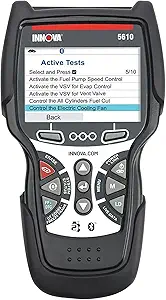 | Best for Bidirectional Diagnostics | Tool type: Bidirectional OBD2 scan tool | Vehicle compatibility: Most OBD2 vehicles | Supported model years: 1996-2023 | VIEW ON AMAZON | See Our Full Breakdown |
More Details on Our Top Picks
Diablosport 9200 Trinity 2 EX Performance Tuner & Monitor
I rank the Diablosport 9200 Trinity 2 EX highest for owners of supported GM trucks and sports cars because it combines calibration changes, live monitoring, and diagnostics in one dedicated device. Its full-color touchscreen offers a more direct workflow than the PC-dependent Hinson HPT MPVI4, while its GM coverage distinguishes it from the Dodge-focused Diablosport 9300. The ability to adjust performance and vehicle settings makes it more relevant to tuning than the diagnostic-first ANCEL DS500BT. Its CARB certification also adds value for buyers concerned about emissions compliance. I would not treat it as universal professional software, though: compatibility stops at listed 1999–2016 GM applications, setup still demands care, and the included calibrations provide less open-ended control than a credit-based writing platform.
Pros:- Combines performance calibration, live monitoring, and diagnostics
- Full-color touchscreen supports a direct in-vehicle workflow
- Customizable settings suit both trucks and sports cars
- CARB EO D-770 certification supports legal use in applicable jurisdictions
Cons:- Compatibility is limited to selected older GM vehicles and V8 engines
- Offers less open-ended calibration control than a PC-based writing platform
- Installation and initial configuration require vehicle-specific care
Best for: GM performance enthusiasts and independent shops working mainly with supported 1999–2016 V8 Escalade, Tahoe, Yukon, Camaro, and Corvette models
Not ideal for: Multi-brand tuners or owners of newer and unlisted GM vehicles, since coverage is restricted to specific model, year, and engine combinations
- Vehicle years:1999–2016
- Supported nameplates:Cadillac Escalade, Chevrolet Tahoe, GMC Yukon, Chevrolet Camaro, Chevrolet Corvette
- Truck/SUV engines:6.0L or 6.2L V8
- Sports-car engines:5.7L or 6.2L V8
- Interface:Full-color touchscreen
- Core functions:Performance calibration, vehicle-setting customization, live monitoring, diagnostics
- Emissions certification:CARB EO D-770
- Warranty:One-year limited warranty
Our verdict“I recommend this as the strongest all-in-one choice for supported older GM vehicles, provided broad multi-brand coverage is not required.”
Diablosport 9300 Trinity 2 EX Performance Tuner & Monitor
The Diablosport 9300 Trinity 2 EX earns its place by targeting HEMI-powered Dodge vehicles rather than spreading its support across unrelated platforms. I see it as the natural counterpart to the Diablosport 9200: both provide touchscreen tuning and live data, but the 9300 serves selected Durango, Ram 1500, Charger, and Challenger applications. Its calibrations can sharpen horsepower, torque, and throttle response, giving it a clearer performance purpose than the ANCEL DS500BT or FOXWELL NT604 Elite diagnostic scanners. The tradeoff is a narrow 2005–2014 compatibility window and engine-specific coverage. It also lacks the broad, flexible writing approach associated with the Hinson HPT MPVI4. For a shop centered on eligible HEMI vehicles, however, the integrated tuning-and-monitoring workflow is easier to adopt than separate hardware and software.
Pros:- Performance calibrations target horsepower, torque, and throttle response
- Full-color touchscreen keeps tuning and monitoring on one device
- Live engine data helps users observe changes after calibration
- Includes diagnostic and vehicle-setting functions
Cons:- Supports only specified Dodge and Ram models with selected HEMI engines
- Provides less calibration freedom than a PC-based professional writing tool
- One-year warranty is relatively short for shop equipment
Best for: Mopar specialists and HEMI owners tuning supported 2005–2014 Dodge and Ram vehicles with 5.7L, 6.1L, or 6.4L V8 engines
Not ideal for: General repair shops and owners of newer Dodge platforms, since its model-year and engine coverage is tightly limited
- SUV and truck compatibility:2005–2014 Dodge Durango and Ram 1500
- Sedan compatibility:2005–2014 Dodge Charger
- Coupe compatibility:2008–2014 Dodge Challenger
- Supported engines:5.7L, 6.1L, and 6.4L V8
- Display:Full-color touchscreen
- Performance functions:Horsepower, torque, and throttle-response calibration
- Monitoring functions:Real-time engine data and diagnostics
- Warranty:One year
Our verdict“I would choose the 9300 for a supported HEMI vehicle, while mixed-fleet tuners should favor a broader platform.”
ANCEL DS500BT Bidirectional Automotive Diagnostic Scanner
I include the ANCEL DS500BT as a diagnostic companion rather than a true calibration suite. Its full-system scans, live data, and bidirectional active tests can help a small shop identify mechanical or electronic faults before blaming a tune. That makes it much broader diagnostically than either Diablosport Trinity model, while Bluetooth 5.0 permits movement around the vehicle without a tethered cable. Compared with the Hinson HPT MPVI4, however, the DS500BT is not the choice for writing performance calibrations; its strengths lie in service procedures and component verification. The 28-plus maintenance functions and lifetime updates reduce recurring tool costs, but feature availability varies by vehicle. I also expect newer users to face a learning curve, and the need for a compatible phone or tablet means it is not a fully self-contained tool.
Pros:- Scans engine, transmission, ABS, SRS, and other major vehicle systems
- Bidirectional tests can command components for fault verification
- Bluetooth 5.0 supports cable-free movement around a vehicle
- Lifetime free updates limit long-term subscription expense
Cons:- Does not replace dedicated performance calibration software
- Vehicle-dependent support can restrict active tests and service functions
- Requires a compatible smartphone or tablet and has a learning curve
Best for: Small repair shops and advanced DIY tuners who need full-system fault finding and active tests alongside separate calibration equipment
Not ideal for: Performance calibrators seeking ECU map editing or tune writing, because this scanner focuses on diagnostics and service functions
- Vehicle electrical support:Most 12V vehicles
- Connectivity:Wireless Bluetooth 5.0
- Primary systems:Engine, transmission, ABS, and SRS
- Additional systems:BCM, TPMS, steering, and suspension
- Diagnostic functions:Code reading, live data, full-system scans, and active tests
- Service coverage:28+ maintenance services
- Named service functions:Oil reset, EPB, SAS, BMS, DPF regeneration, and injector coding
- Update policy:Lifetime free updates
Our verdict“I recommend the DS500BT as a workshop diagnostic partner, not as the main tool for creating or writing performance tunes.”
Hinson HPT MPVI4 Code Reader and Write Tool with USB Cable
The Hinson HPT MPVI4 has the most professional-leaning hardware proposition in this group: a dual-core interface built to read and write across hundreds of domestic and foreign vehicles. Compared with the vehicle-specific Diablosport 9200 and 9300, its wide platform coverage better suits tuners who work on varied customer cars and want a PC-centered workflow. USB-C supplies a stable wired connection, while Bluetooth adds flexibility when a cable is inconvenient. That freedom carries the lineup’s largest cost and setup caveat: this listing includes hardware and a USB cable, but software and credits are separate. Buyers must account for licensing before the tool can support paid tuning work. I would place it above the ANCEL DS500BT for calibration potential, yet below a complete bundle for immediate usability.
Pros:- Read-and-write capability aligns with advanced calibration work
- Supports hundreds of domestic and foreign vehicles
- Dual-core processor is designed for faster tool operation
- USB-C and Bluetooth provide wired and wireless connection choices
Cons:- Hardware-only package does not include software or licensing credits
- Total working cost can rise as credits are purchased for vehicles
- Less approachable than a self-contained touchscreen tuner
Best for: Experienced calibrators and performance shops prepared to buy the required software access and vehicle credits for a varied client fleet
Not ideal for: Beginners wanting ready-to-run preset tunes, since the package omits software and credits and assumes a PC-based workflow
- Tool type:Code reader and write tool
- Processor:Dual-core
- Wired connectivity:USB-C
- Wireless connectivity:Bluetooth
- Vehicle compatibility:Hundreds of domestic and foreign vehicles
- Included hardware:MPVI4 interface and USB cable
- Software inclusion:Not included
- Credit inclusion:Credits sold separately
Our verdict“I would pick the MPVI4 for serious multi-vehicle calibration work only after budgeting for its separate software and credit requirements.”
Engine Management: Advanced Tuning
Engine Management: Advanced Tuning fills the knowledge gap that hardware alone cannot address. I rank it as a learning resource for readers who want to understand engine-management principles before making calibration changes. Unlike the Diablosport 9200, it cannot flash a vehicle or display live sensor data; compared with the Hinson HPT MPVI4, it teaches concepts without supplying a working interface, software, or credits. Its advanced tuning focus can help enthusiasts and professionals connect calibration choices with engine behavior, which matters when preset tunes no longer meet a project’s needs. The drawback is equally clear: the supplied product information identifies no practical exercises or step-by-step procedures, limiting its value for readers who learn by following exact workflows. I view it as theory-led preparation, not a substitute for compatible tuning and diagnostic equipment.
Pros:- Explains engine-management and advanced tuning concepts
- Serves both serious enthusiasts and automotive professionals
- Builds background knowledge that hardware instructions may omit
Cons:- Cannot connect to, diagnose, or calibrate a vehicle
- No practical examples or step-by-step procedures are identified
- Limited supplied details make its depth and edition-specific coverage hard to judge
Best for: Performance enthusiasts, apprentice calibrators, and working technicians seeking theory to support more informed engine-management decisions
Not ideal for: Buyers who need software, vehicle connectivity, guided procedures, or a tool capable of reading and writing an ECU
- Product format:Book
- Identifier:ISBN-10 1932494421
- Primary subject:Engine management
- Technical focus:Advanced tuning techniques
- Intended audience:Automotive enthusiasts and professionals
- Stated purpose:Optimizing engine performance
- Practical exercises:Not specified in the supplied product data
Our verdict“I recommend this book as supporting education for a tuner, but every hands-on buyer will still need compatible software and hardware.”
FOXWELL NT604 Elite OBD2 Diagnostic Tool
I rank the FOXWELL NT604 Elite as the best diagnostic companion because its coverage of engine, transmission, ABS, and SRS systems helps identify faults before any tuning work begins. Support for more than 60 brands also makes it more practical for a mixed-vehicle workshop than a vehicle-specific performance tuner such as the Diablosport 9200 Trinity 2 EX. AUTOVIN, live-data playback, and the built-in code library can shorten diagnosis and make recorded results easier to review.
The limitation is scope: this is diagnostic equipment, not ECU tuning software. It cannot write calibrations, perform repairs, or handle maintenance jobs such as battery registration and oil resets. Compared with the Innova 5610, it offers broad system scanning but fewer service capabilities. I would pair it with dedicated tuning hardware rather than buy it as a standalone tuning solution.
Pros:- Scans four major vehicle systems rather than limiting diagnosis to engine codes
- Supports more than 60 global vehicle brands
- Includes live-data streaming, playback, and a built-in DTC library
- Lifetime updates and a protective case reduce long-term ownership costs
Cons:- Cannot modify ECU calibrations or write performance tunes
- Lacks oil reset, battery registration, and other maintenance functions
- AUTOVIN coverage can be inconsistent on older vehicles and certain brands
Best for: Independent tuners and multi-brand workshops that need broad pre-tune fault scanning across engine, transmission, ABS, and SRS modules
Not ideal for: Calibration specialists seeking ECU map editing, code writing, relearn procedures, or maintenance resets from one device
- Tool type:Multi-system OBD2 diagnostic scanner
- Brand coverage:More than 60 car brands worldwide
- Systems covered:Engine, transmission, ABS, and SRS
- Diagnostic functions:Reads and clears fault codes
- Live data:Streaming and playback supported
- Vehicle identification:AUTOVIN supported, with coverage limitations
- Reference features:Built-in DTC library and print support
- Updates:Lifetime updates included
- Maintenance functions:Reset and relearn functions not supported
Our verdict“Buy the FOXWELL NT604 Elite for broad pre-tune diagnostics, but pair it with a dedicated platform if calibration changes are the real goal.”
Innova 5610 OBD2 Bidirectional Scan Tool
I place the Innova 5610 ahead of basic code readers for technicians who need bidirectional controls and advanced reset functions. Those capabilities let a buyer command supported vehicle components and confirm responses, which is more useful during troubleshooting than simply clearing a warning light. Compared with the FOXWELL NT604 Elite, the Innova is better suited to active diagnostic work and service resets, while its real-time data supports informed decisions before changing a calibration.
It still falls short of the Hinson HPT MPVI4 as a professional tuning platform because it does not write custom ECU maps. Coverage also varies by make, model, system, and function, so buyers should verify their exact vehicle before purchase. App-dependent features need internet access, and pre-1996 cars fall outside its stated range. I see it as a capable workshop diagnostic tool, not a replacement for calibration software.
Pros:- Bidirectional capability supports active component testing on compatible vehicles
- Real-time data and advanced reset functions aid pre-tune troubleshooting
- English, Spanish, and French interfaces suit multilingual workshops
- Free updates and US-based ASE-certified support add ongoing value
Cons:- Vehicle and function coverage is not universal, even within the stated model-year range
- Cannot replace dedicated ECU calibration and writing hardware
- Some app features depend on an internet connection
Best for: Professional technicians and tuning shops that need active component checks, live data, and supported service resets on 1996-2023 vehicles
Not ideal for: ECU calibrators who need custom map writing, owners of pre-1996 cars, or workshops without dependable internet access for app features
- Tool type:Bidirectional OBD2 scan tool
- Vehicle compatibility:Most OBD2 vehicles
- Supported model years:1996-2023
- Diagnostic data:Real-time vehicle data
- Active testing:Bidirectional controls on supported vehicles
- Service capability:Advanced reset functions
- Languages:English, Spanish, and French
- Technical support:US-based ASE-certified support
- Updates:Free updates included
Our verdict“Choose the Innova 5610 when active diagnostics and reset functions matter more than ECU map editing.”
How We Picked
I evaluated every option through a professional tuning lens, giving the most weight to ECU reading and writing, calibration flexibility, useful data logging, and support for repeatable workflows. I then examined vehicle compatibility, usability, diagnostic reach, licensing requirements, update support, and total ownership cost. Products earned higher positions when they could change engine behavior safely and methodically, rather than merely clear codes or display sensor values. This approach places calibration depth ahead of accessory count.
I put the Hinson HPT MPVI4 first because it provides the clearest route to custom calibration, while the DiabloSport pair trades editing freedom for quicker preset-based changes and an integrated monitor. The bidirectional diagnostic tools follow because they are valuable for fault isolation and pre-tune checks but do not replace a map editor. The FOXWELL sits below the bidirectional scanners because its role is more basic, and the book ranks seventh because it teaches theory without connecting to a vehicle. My ordering reflects fitness for professional tuning, not a claim that the lowest-ranked item is poorly made for its intended job.
Factors to Consider When Choosing Professional Car Tuning Software
I would begin by defining the job: custom ECU calibration, preset performance tuning, workshop diagnosis, or technical education. Products marketed around OBD2 connectivity often appear interchangeable, yet they may differ completely in what they can change. The five factors below help separate a true tuning workflow from tools that only support it.
Choose Calibration or Diagnosis First
Before I compare screens, cables, or code coverage, I identify whether the goal is changing calibration data or finding mechanical and electronic faults. A calibration platform can alter tables governing fuel, ignition, torque, boost, and related strategies when the supported ECU allows it. A scan tool usually reads live data and trouble codes but may have no map-editing function. Bidirectional control adds commands such as activating components or initiating service routines, yet that still does not make the scanner a tuner. A common buying mistake is paying for extensive diagnostics while expecting horsepower adjustments. I would put ECU writing capability at the top of the checklist when performance changes are the primary goal.
Verify Vehicle, ECU, and License Coverage
I treat exact fitment as a buying requirement rather than a minor specification. Matching the make and model is not enough because engine choice, model year, transmission, ECU revision, and prior modifications can affect support. Two devices from the same family may target different applications even when their housings and advertised features look alike. I would check the manufacturer’s current vehicle list and confirm whether an ECU unlock or bench service is required. Buyers should also ask whether transmission control needs a separate license. Verifying these details before purchase prevents the common problem of owning capable hardware that cannot access the intended controller.
Price the Complete Tuning Workflow
The device price rarely represents the full ownership cost of professional car tuning software. I add licensing credits, vehicle slots, paid tune files, ECU services, adapters, a suitable computer, and future updates to the budget. A preset handheld tuner may cost more upfront yet require fewer extras for a single supported vehicle. A flexible editor can become more expensive as additional controllers and vehicles are licensed, but it offers far more room for paid or custom calibration work. I would also check whether licenses stay with the interface, the user account, or the vehicle. This calculation separates low entry price from long-term value.
Match Data Quality to the Job
Good tuning depends on usable log data, not merely a long list of sensor names. I look for configurable channels, a stable sample rate, export options, graphing, and the ability to record parameters that matter to the target engine. Too many channels can slow a log and make patterns harder to interpret, so a focused channel list often produces better evidence. Wideband oxygen data may require extra hardware or analog integration beyond the vehicle’s standard sensors. Diagnostic scanners remain helpful here because they can reveal faults, but they may lack the resolution or tuning-specific parameters needed for calibration decisions. I favor a platform with repeatable logging and clear file comparison over one that simply displays the most gauges.
Plan for Recovery, Updates, and Technical Support
Writing an ECU creates a different level of risk from reading codes, so I examine recovery options before focusing on performance features. The workflow should preserve the original calibration, maintain steady battery voltage, and provide clear instructions if communication is interrupted. I would also research how firmware and software updates affect saved files, supported controllers, and older computers. Active communities and knowledgeable calibrators can be more valuable than a polished screen when an uncommon ECU issue appears. Emissions rules and warranty terms may restrict which changes are suitable for a road vehicle, even when the software permits them. A professional setup needs reliable support and a documented rollback path, not just powerful editing controls.
Frequently Asked Questions
Which Products in This Roundup Can Actually Change an ECU Calibration?
I classify the Hinson HPT MPVI4 as the clearest custom-calibration option because it connects to an editing, scanning, and licensed writing ecosystem. The DiabloSport 9200 and 9300 can apply supported performance tunes, but they focus more on preset or supplied calibrations than unrestricted table-by-table work. The ANCEL DS500BT, Innova 5610, and FOXWELL NT604 are diagnostic devices and should not be purchased as ECU map editors. Bidirectional commands on a scanner control supported vehicle functions temporarily; they do not rewrite performance maps. The Engine Management book provides theory without electronic access to a vehicle.
How Do I Choose Between the DiabloSport 9200 and 9300?
I would choose between them by checking exact vehicle support, not by assuming the larger model number is more advanced. Confirm the model year, engine, transmission, ECU, and any required unlock procedure against the current application list. Their shared Trinity 2 EX format makes the day-to-day experience broadly similar, so fitment carries more weight than cosmetic resemblance or numbering. I would also compare the included tune support and whether the device can be unmarried cleanly before moving it to another vehicle. If both appear compatible, written confirmation from the seller or manufacturer is the safest tie-breaking step.
Is the HP Tuners Route Worth Paying More for Than a DiabloSport Tuner?
I would pay more for the HP Tuners route when the goal involves custom modifications, repeated data analysis, or working with a professional calibrator. Its extra control makes sense for altered fuel systems, forced induction, transmission tuning, or builds that fall outside preset tune assumptions. DiabloSport is a better fit when a supported, lightly modified vehicle needs a quicker packaged solution with less software study. HP Tuners can also bring added credit costs and greater responsibility for calibration choices. The added expense buys flexibility, not automatic performance or safety.
Can a Bidirectional Scanner Replace a Tuning Interface?
No, I would treat bidirectional testing and calibration as separate capabilities. A bidirectional scanner can request supported actions from modules, which helps diagnose components and verify repairs. A tuning interface reads and writes calibration areas that control how the powertrain behaves under changing loads and operating conditions. The ANCEL DS500BT and Innova 5610 can support a tuner by exposing faults before calibration work begins, but they do not replace an editor and compatible writing interface. For a workshop serving both repair and performance customers, owning both tool types may be the practical answer.
What Is the Safest Starting Point for a Beginner Who Wants More Performance?
I would start with a vehicle-specific preset tuner such as the compatible DiabloSport Trinity 2 EX variant rather than editing calibration tables without training. Before flashing, the vehicle should have no unresolved warning lights, weak battery, fuel-delivery problem, or cooling fault. A basic scanner can help with that health check, while the Engine Management book can build the theory needed for later custom work. Beginners should save the stock file, use the required fuel grade, and avoid stacking unrelated tuning devices. The HPT MPVI4 path makes more sense after the buyer understands logging, licensing, and the effect of each calibration change.
Conclusion
For professional calibration work, my best overall pick is the Hinson HPT MPVI4 because it offers the strongest path to custom editing, logging, and repeatable vehicle-specific tuning. It is also my best premium choice for modified builds, provided the buyer budgets for software licensing and training. For beginners who want supported performance changes without building maps from scratch, I would choose the compatible DiabloSport 9200 Trinity 2 EX. The DiabloSport 9300 fills the same plug-and-play role when its application list is the correct match for the vehicle.
For diagnostics, my best value pick is the Innova 5610, especially when bidirectional functions matter more than custom tuning. I would choose the ANCEL DS500BT for broader workshop-style diagnostic needs and the FOXWELL NT604 Elite for simpler code reading and system checks. Readers focused on learning calibration principles should add Engine Management: Advanced Tuning, while recognizing that it is a reference rather than software or hardware. My final choice would follow the task: HP Tuners for custom calibration, DiabloSport for packaged performance changes, and a dedicated scanner for diagnosis.
Fall Picks
fall essentials
As an affiliate, we earn on qualifying purchases.